iptables in linux
An email sent from bwg told me that my service had been banned due to a DDoS attack.
My response is to change all the related passwords of the control pane and root user. But how to stop the future attacks? iptables may be one of the solutions.
Background
I found a bash script which adds rules using iptables to prevent DDoS attacks.
1
2
3
4
5
6
7
list=`grep nameserver /etc/resolv.conf |awk '{print $NF}'`
for i in $list
do
        iptables -A OUTPUT -p udp -d $i --dport 53 -j ACCEPT
done
iptables -A OUTPUT -p udp -j DROP
service iptables save
The main idea is to drop any udp packets except real DNS requests. At first glance I have no idea what happens here. After digging on the internet, the script is self-explained.
- Found all valid DNS server IP addresses
- The
forloop to allow any DNS requests:- protocol: udp
- port: 53
- destination: server found in
/etc/resolv.conf - target: ACCEPT
- Append to chain
OUTPUTof default tablefilter
- After the
forloop, drop any other udp packets - Save the iptables
iptables packet process overview
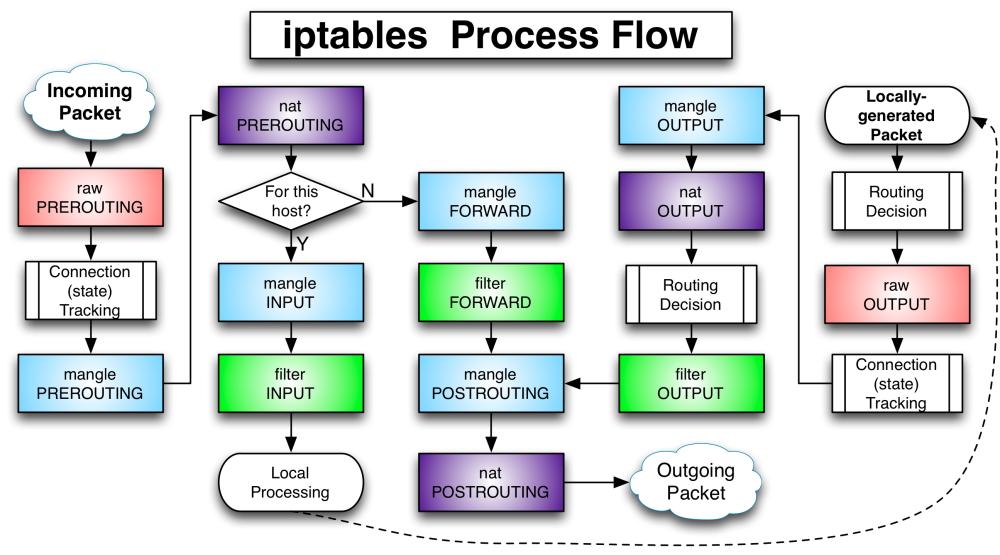
Concepts
Table/Chain/Rule
One table(Upper text in previous colorful rectangles) can contain several chains, each chain(Lower text in previous colorful rectangles) can contain several rules.
Usually there are four tables:
- filter: the default table
- INPUT
- OUTPUT
- FORWARD
- nat: creates a new connection
- PREROUTING
- OUTPUT
- POSTROUTING
- mangle: specialized packet alteration
- INPUT
- PREROUTING
- FORWARD
- OUTPUT
- POSTROUTING
- raw: highest priority
- PREROUTING
- OUTPUT
Target
- ACCEPT
- DROP: request timeout
- RETURN
- QUEUE
- user-defined chain
Common commands
Show statistics about iptables for each chain
1
iptables -L -v
Set default policy for each chain
1
2
3
iptables --policy/-P INPUT ACCEPT
iptables --policy/-P OUTPUT ACCEPT
iptables --policy/-P FORWARD ACCEPT
Append/Delete/Insert connections
1
2
3
4
5
6
7
8
9
10
11
12
13
14
iptables -A INPUT -s 10.10.10.3 -j DROP
iptables -A INPUT -s 10.10.10.0/24 -j DROP
iptables -A INPUT -s 10.10.10.0/255.255.255.0 -j DROP

# Support chain rulenum, start from 1
# iptables -L --line-numbers
iptables -D INPUT -s 10.10.10.3 -j DROP
iptables -D INPUT -s 10.10.10.0/24 -j DROP
iptables -D INPUT -s 10.10.10.0/255.255.255.0 -j DROP
iptables -D INPUT 1

iptables -I INPUT -s 10.10.10.3 -j DROP
iptables -I INPUT -s 10.10.10.0/24 -j DROP
iptables -I INPUT -s 10.10.10.0/255.255.255.0 -j DROP
Add/Delete/Rename/Go to chain
1
2
3
4
iptables -N/--new-chain chain_name
iptables -X/--delete-chain chain_name
iptalbes -E/--rename-chain old_chain_name new_chain_name
iptables -s 10.10.10.10 -p tcp -g MyChain
Block certain services
ssh can be found in file /etc/services
1
iptables -A INPUT -p tcp --dport ssh -s 10.10.10.10 -j DROP
Connection types:
-p udp-p tcp
With states
- Allow connections from
10.10.10.10 - Allow connections already ESTABLISHED to
10.10.10.10
1
2
iptables -A INPUT -p tcp --dport ssh -s 10.10.10.10 -m state --state NEW,ESTABLISHED -j ACCEPT
iptables -A OUTPUT -p tcp --sport 22 -d 10.10.10.10 -m state --state ESTABLISHED -j ACCEPT
Clean all rules
1
2
iptables -F
iptables -t INPUT -F
Negative rules
1
2
3
iptables -p/--protocol ! tcp -j DROP
iptables -s/--source ! 10.10.10.10 -j DROP
iptables -d/--destination ! 10.10.10.10 -j DROP
Save changes
1
2
iptables-save
service iptables save